How to add custom symbolic constants in IDA
 Drew Hintz (drew) <openrce Drew Hintz (drew) <openrce guh guh nu> nu> |
Friday, May 19 2006 19:22.26 CDT |
Quick Answer: use an Enum
Explanation and long answer:
Let's say that you're using IDA, run across a numerical constant, and want to replace the numerical constant with a symbolic constant. IDA has a great pre-built database of common symbolic constants. To access this, right-click on the constant in question, select Symbolic Constant, Use standard symbolic constant. However if you want to add your own custom symbolic constant, you'll want to add an enum. The process isn't advanced, but I've run into a couple IDA users that weren't familiar with it.
Let's use the following code from notepad.exe as an example:
push    20019h          ; samDesired

xor     esi, esi

push    esi             ; ulOptions

push    offset aClsidAdb880a6D ; lpSubKey

push    80000000h       ; hKey

call    ds:RegOpenKeyExA
In order to add a custom symbolic constant, open the Enumerations subview (shift+F10). Press the Insert key to add a new enumeration type. Ignore all the settings for now and just hit Ok. Now that you have a new enumeration type, press N to create a new symbolic constant. Put your new name, for example mySAM, as the name, and the value for the constant, for example 0x20019. Please note that you'll have to precede hex values with "0x". Now go back to your disassembly subview, right click on the numeric constant, select Symbolic constant, and your newly created symbolic constant should appear just like the following:
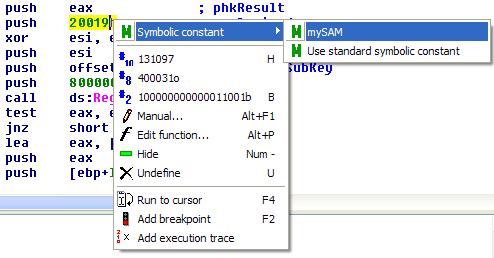
Side note: Some readers might notice that the correct symbolic constant for this 20019h is already included in IDA's standard symbolic constant list.
Comments
| Posted: Wednesday, December 31 1969 18:00.00 CST | |