

Flag: Tornado!
Hurricane!
|
|
Topic created on: August 23, 2008 18:00 CDT by staticares  .
Im working on translating a virtual address to a physical address.
I know that in Real mode its just
physical address = virtual address * 0x10 + OFFSET
But, as im running in Protected mode. It has to be done differently. I need to use the descriptor table and segment descriptor.
Here are the steps i was told to take:
1. Find the start of the descriptor table (GDTR register)

2. Find the SEGMENTth entry of the table, this is the segment descriptor corresponding to the segment SEGMENT.

3. Find the base physical address � of the segment

4. Compute � = � + OFFSET
My question is, can I receive some help on doing this starting with step 1?
Thanks,
Static Ares
Are You using some OS+API ?
If it's Windows, for step 1 there is a function called "GetThreadSelectorEntry". Example of usage (gcc/g++):
/* ignore the 'control reaches end of non-void function' warnings */

 */

#include<windows.h>

#include<string.h>

#include<stdlib.h>

#include<stdio.h>


/* push SEG; pop eax */

WORD GetCS(void) { __asm__(".ascii \"\\x0E\\x58\""); }

WORD GetDS(void) { __asm__(".ascii \"\\x1E\\x58\""); }

WORD GetES(void) { __asm__(".ascii \"\\x06\\x58\""); }

WORD GetFS(void) { __asm__(".ascii \"\\x0F\\xA0\\x58\""); }

WORD GetGS(void) { __asm__(".ascii \"\\x0F\\xA8\\x58\""); }

WORD GetSS(void) { __asm__(".ascii \"\\x16\\x58\""); }


int

main(void)

{

  LDT_ENTRY ldt;

  HANDLE thdl = GetCurrentThread();


#define PRINT_SEG(a) { GetThreadSelectorEntry(thdl, Get ## a (), &ldt);\

                       printf(#a ": %.8x (%.8x)%s\n",\

         ldt.BaseLow | (ldt.HighWord.Bytes.BaseMid << 16) | (ldt.HighWord.Bytes.BaseHi << 24),\

         (int)(short)ldt.LimitLow, ldt.LimitLow > 0 ? "" : " [unused]"); }


  PRINT_SEG(CS);

  PRINT_SEG(DS);

  PRINT_SEG(ES);

  PRINT_SEG(FS);

  PRINT_SEG(GS);

  PRINT_SEG(SS);


  return 0;

}
If You are not using Windows, for example You are in protected mode, then there is an instruction called SGDT (Store Global Descriptor Table Register).
|
Thanks!, looks like a very clear awnser. Ill study the source above.
ps. Yes, im on windows (xp).
--
Update
--
I compiled the source. Running on windows xp like:
nameofexe.exe > temp.txt
The content in temp.txt after execution is:
CS: 00000000 (ffffffff)
DS: 00000000 (ffffffff)
ES: 00000000 (ffffffff)
FS: 7ffde000 (00000fff)
GS: 00000000 (00000000) [unused]
SS: 00000000 (ffffffff)
So that start of the Descriptor table for this application is stored in FS and has the value(/address) 7ffde000?
--
Update
--
Here is a version that compiles under Visual Studio:
#include<windows.h>

#include<string.h>

#include<stdlib.h>

#include<stdio.h>


/* push SEG; pop eax */

WORD GetCS(){__asm{

				PUSH CS

				POP EAX}}


WORD GetDS(){__asm{

				PUSH DS

				POP EAX}}


WORD GetES(){__asm{

				PUSH ES

				POP EAX}}


WORD GetFS(){__asm{

				PUSH FS

				POP EAX}}


WORD GetGS(){__asm{

				PUSH GS

				POP EAX}}


WORD GetSS(){__asm{

				PUSH SS

				POP SS}}


int main(void)

{

  LDT_ENTRY ldt;

  HANDLE thdl = GetCurrentThread();


#define PRINT_SEG(a) { GetThreadSelectorEntry(thdl, Get ## a (), &ldt);\

                       printf(#a ": %.8x (%.8x)%s\n",\

         ldt.BaseLow | (ldt.HighWord.Bytes.BaseMid << 16) | (ldt.HighWord.Bytes.BaseHi << 24),\

         (int)(short)ldt.LimitLow, ldt.LimitLow > 0 ? "" : " [unused]"); }


  PRINT_SEG(CS);

  PRINT_SEG(DS);

  PRINT_SEG(ES);

  PRINT_SEG(FS);

  PRINT_SEG(GS);

  PRINT_SEG(SS);


  return 0;

} |
Oh, sorry, I didn't look through all the points. There is one more thing that I should have pointed out.
Mainly, your points are missing one step, and a little mistaking in another.
I'll try to explain:
When You have for example mov eax, [0x12345678], then 0x12345678 is in fact a Virtual Address in the segment DS (so it's DS:0x12345678).
First, You have to convert that DS:0x12345678 to a Linear Address, which is still kinda Virtual, but does not have the segment inside.
To do that, You have to use the above code. In case of DS, the segment starts at DS: 00000000 (as You have pasted). To calculate the Linear Address, You just add that 0x12345678 to the start of DS segment. You'll get 0x12345678 of course.
Please note that all the segments except of GS (which is unused) and FS (which has a special value) have the start at 0 in the linear address space.
OK, Now You have the Linear Address, and You have to convert it to a Physical Address.
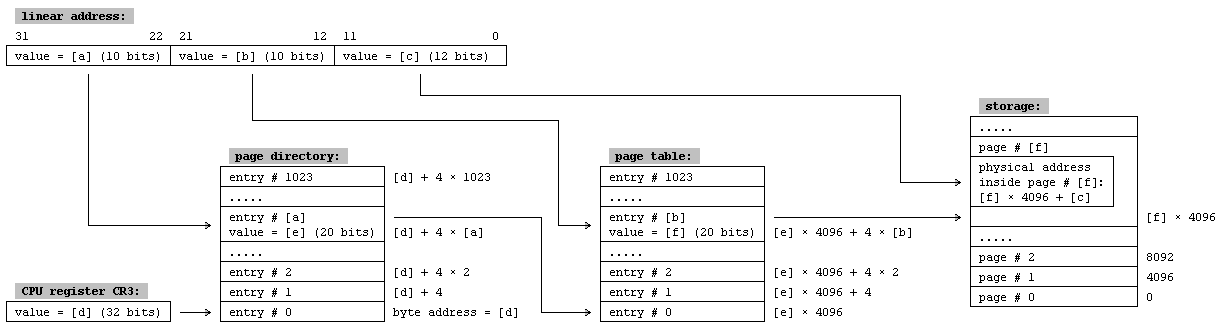
The Linear Address has 3 parts (see this picture). The bottom 12 bits are an offset on a Page (the page normally has 4096 bytes (0x1000), but sometimes it's larger; however I'll focus on the 0x1000 type), the middle 10 bits is the Page Index in the Page Table, and the top 10 bits are the Page Table Index in the Page Directory.
So in the example case it's the following:
Offset = 0x678
PageIndex = 0x345
PageTable = 0x48
  unsigned int addr = 0x12345678;

  printf("Offset   : %x\n", addr & 0xfff);

  printf("PageIndex: %x\n", (addr >> 12) & 0x3ff);

  printf("PageTable: %x\n", (addr >> 22) & 0x3ff);
Anyway, once You have this, You must have access to the Page Directory, Page Table etc. And as far as I know, You don't normally have access to it - You have to be in ring 0, or have the tables exported somehow into ring 3 (a driver could do it).
After reading where the page starts in the physical memory (using that PageDirectory[PageTable][PageIndex]), You add teh Page offset to it, and that finally is the physical address ;>
Btw, thanks for the code for CL ;>
|
0.o Wow.
I think im going to read this a couple times before I react..
----
Update
----
I understand now. Thanks for all this information!
|
|
Well you can try the Virtual2Physical ollydbg plugin (Open Source)
|
> injstar: Well you can try the Virtual2Physical ollydbg plugin (Open Source)
Im going to look into that. Thanks for the tip.
------
Update
------
Olly keeps crashing, ill keep working on it, but any hint or tip is welcome.
|
normally only FS segments has a non-zero base address,
CS/DS/SS should be 0..FFFFFFFF always, according to flat mode. you can use SGDT [somewhere] instruction to get base:limit for GDT. and if you have trouble with crashing, check some stuff about PAE.
|
To be honest static...Your best bet is to read up in the intel docs on x86 assembly. That'll show you how things work.
You'll want to go here:
http://developer.intel.com/products/processor/manuals/index.htm
Get the BAsic Architecture, instruction references, and programming guides. They are long...But you can look at the bits you want.
Really becoming good at this stuff is about experimentation and actually reading up on your stuff. Not dark magic(though some of us might like to think so:) )
|
Note: Registration is required to post to the forums.
|
|
|
|
There are 31,328 total registered users.
|
|



![[+] expand](/imagery/files/soysauce_blueprint.gif)